2025年3月23日星期日

AI Agents 101: Unlocking the Secrets of Smart Automation

 Let’s talk about AI agents – they’re like the superheroes of the tech world, doing tasks on their own, much like you or I would. Imagine software that can look around, think through things, and act without needing someone to hold its hand every step of the way.

AI Agents

That’s what AI agents are all about. The buzz around them has grown thanks to some pretty smart tech like large language models (LLMs), which have totally changed how we interact with machines.

This guide is here to break down what these agents are, how they work, and how you can use them, showing you how they’re set to shake up industries or even your day-to-day life.

What are AI Agents?

Think of AI agents as your go-to tech buddies. They’re programs that can work independently in whatever environment you place them in. Unlike standard apps or software that simply follow commands, these agents can figure out what to do next, plan their actions, and accomplish tasks without constant supervision.

AI agents take in information from their surroundings, analyze it, and decide how to act to achieve their goals. This makes them incredibly versatile and capable of handling complex tasks.

The cool part? AI agents get smarter over time. They learn from past experiences, so they’re not just following a script.

For instance, you could have an AI agent helping answer customer questions, managing logistics, generate art, or even driving cars.

What sets them apart is their ability to adapt and improve. Using advanced technologies like machine learning, they continuously learn and get better as they go.

Types of AI Agents

AI agents come in different types, each designed to tackle tasks in unique ways:

  • Simple Reflex Agents: These are the “react first, think later” type. They respond to immediate stimuli, like a basic customer service bot that provides a canned response based on the user’s input.
  • Model-Based Reflex Agents: A step up in intelligence, these agents maintain a mental map of their environment. They consider the context of situations, making them ideal for tasks where understanding the surroundings is crucial.
  • Goal-Based Agents: These agents focus on achieving specific objectives. They plan their actions strategically, similar to how a chess player devises moves to win the game.
  • Utility-Based Agents: These agents prioritize decisions based on the “best outcome.” For instance, they might choose a route home by factoring in traffic, road conditions, and even coffee shop stops along the way.
  • Learning Agents: The most advanced type, learning agents adapt and improve through experience. They evolve by analyzing interactions, similar to how you learn to master a video game or perform better at work.

Each type serves a purpose, from handling simple tasks to navigating complex and dynamic environments. Together, they showcase the versatility of AI in transforming how we live and work.

Components of AI Agents

Every AI agent functions like a small tech ecosystem, built from several essential parts:

  • Sensors: These are the agent’s eyes and ears. For a robot, sensors might include cameras or microphones. For a software agent, they could involve reading data from apps, tracking clicks, or even analyzing tweets.
  • Actuators: Think of these as the hands and feet of the agent. Actuators enable actions, whether that’s moving a robot arm or sending an email on your behalf.
  • Processing Unit: This is the brain of the agent. It interprets data collected by the sensors and decides what actions to take. It can use anything from basic logic to advanced algorithms to make decisions.
  • Memory: Just as humans rely on memory, AI agents need to store information about past events to improve future decisions. Memory can involve anything from logging past conversations to tracking the effectiveness of previous actions.
  • Learning Mechanism: This component helps the agent evolve. Using techniques like machine learning, it enables the agent to learn from experiences and adjust its behavior or decision-making based on new data or feedback.

Together, these components allow AI agents not only to perform tasks but to adapt and improve over time, making them more effective and aligned with their environment.

How AI Agents Work

AI agents operate in a loop that’s similar to a daily routine:

  1. Perception: First, they gather information. For a chatbot, this means reading your message. For a robot, it might involve scanning its surroundings using cameras or sensors.
  2. Processing and Decision Making: Next, they analyze the data, consider past experiences, and figure out the best course of action. This is the moment where the agent decides, “What should I do now?”
  3. Action Execution: Then, they take action. A smart home agent, for example, might turn up the heat, while a game AI could move a character in response to the player’s actions.
  4. Feedback and Learning: Finally, they evaluate the outcome. Was the action successful? Did the user respond positively? This feedback helps the agent improve and adapt, making it more effective the next time.

For example, imagine an AI managing your home. It detects that the room is getting cold, decides to warm it up based on your preferences, turns on the heater, and learns from the outcome—whether based on your feedback or the temperature change—how to improve its actions in the future.

This continuous cycle of perceiving, deciding, acting, and learning makes AI agents dynamic, ever-improving, and more helpful over time.

Applications of AI Agents

AI agents are everywhere, simplifying life and making businesses smarter.

Here are some of their key applications:

ApplicationDescription
Customer ServiceAI agents serve as the friendly faces (or voices) greeting you online. They handle tasks like resetting passwords, answering questions, and solving complex issues 24/7.
HealthcareThese agents monitor health metrics, remind you to take medications, and assist doctors by analyzing medical data for more accurate diagnoses.
GamingIn gaming, AI agents create lifelike characters that react dynamically to player actions, making the game world engaging and unpredictable.
Business AutomationAI agents streamline operations by managing schedules, optimizing logistics, and making decisions in real-time, working tirelessly around the clock.
FinanceThey act as personal finance assistants, analyzing markets, providing investment recommendations, and detecting fraudulent activities before they escalate.
Smart Homes and IoTAI agents power smart homes by learning your preferences, adjusting the environment to your comfort, and securing your home when you’re away.
EducationIn education, AI agents personalize learning by tailoring study plans, providing instant feedback, and adapting to individual learning styles.
CybersecurityThey protect your digital life by monitoring for threats and taking quick action to secure your data and systems.

These applications demonstrate how versatile AI agents are, transforming the way we work, play, and live through proactive, personalized, and continually improving solutions.

Building AI Agents

Want to create your own AI agent? Here’s how you can get started:

  1. Define What You Want: Determine the purpose of your agent. Will it manage a smart home, assist with customer queries, or tackle another task?
  2. Choose Your Tools: Python is a popular choice for AI development, thanks to libraries like TensorFlow and PyTorch. You can also explore frameworks like AutoGen for building agents.
  3. Design the Agent: Plan how the agent will sense, decide, and act. What data will it need, and how will it make decisions?
  4. Write the Code: Program the components of your AI agent. Define how it will collect data (sensors), process and analyze this data using AI models (processing), and execute its decisions (actuators).
  5. Add Learning: Incorporate a learning mechanism if you want the agent to improve over time. It could learn from user interactions or analyze data trends.
  6. Test and Refine: Test the agent in a controlled environment. Identify what works, address issues, and make improvements.
  7. Deploy: Once satisfied with the agent’s performance, deploy it in the real world or integrate it into a system.
  8. Ethics and Privacy: Consider ethical implications. How does the agent handle data? Could it have biases? Is it transparent in its operations?

Building an AI agent isn’t just about coding; it’s about understanding AI, solving real problems, and continuously learning from each deployment. It’s an ongoing process of refinement and adaptation to make your agent truly helpful.

Future of AI Agents

The future with AI agents? It’s looking exciting. Here’s what we might see:

  • More Freedom: AI agents will take on even greater autonomy, potentially running entire factories, cities, or complex systems.
  • Smarter Smart Homes: With advancements in IoT and edge computing, agents will make faster decisions and keep data processing local, ensuring better privacy at home.
  • Personalized Experiences: AI agents will excel at tailoring services to individual preferences, enhancing everything from entertainment recommendations to health advice.
  • Ethical AI: There will be a stronger focus on developing AI systems that are fair, transparent, and aligned with societal values.
  • Teamwork with Humans: Instead of replacing us, AI agents will work as partners, boosting creativity and efficiency in our tasks.
  • Real-Time Learning: Agents will adapt instantly to new situations, learning continuously from their environment.
  • Collaborative Efforts: Swarms of AI agents could work together, like a beehive, to tackle massive challenges efficiently.
  • Exploration: AI agents will venture into environments humans can’t easily access, like deep space, the ocean floor, or hazardous disaster zones.
  • Enhanced Security: As their role becomes more critical, ensuring AI agents are secure and resilient against hacking will be a top priority.
  • Governance and Regulation: Governments will establish laws to ensure responsible AI usage, addressing issues like privacy, job security, and ethical deployment.

The future of AI agents is about integrating them into our lives in ways that are beneficial, ethical, and aligned with human values. They hold the promise of anticipating our needs, solving problems before they arise, and enhancing our quality of life.

Final Thoughts

AI agents are set to reshape how we live and work, offering a future where technology thinks independently while collaborating with us. They simplify tasks, enhance decision-making, and drive innovation across industries. But with this potential comes the need to address ethics, privacy, and maintaining human oversight.

Whether you’re building cutting-edge AI, leading a business, or simply curious about the future, exploring AI agents today is a wise step. It’s not just about their current capabilities—it’s about shaping a better tomorrow. Let’s harness their potential responsibly to ensure AI serves everyone.

How to Use LM Studio for AI Assistance in Visual Studio Code

 In our previous article, we explored several code editors with built-in AI features. However, these features often rely on a cloud connection and may require subscriptions to access all functionalities. This can be inconvenient if you’re working offline or find the subscription costs outweigh the benefits.

If you’re looking for a free and offline alternative, LM Studio is a great option. This desktop application allows you to run powerful Large Language Models (LLMs) directly on your computer. You can even choose from various models available through the Ollama platform.

In this article, we’ll see how to use LM Studio with Visual Studio Code (VS Code) to get AI assistance in the code editor. We’ll cover setting it up, connecting it to VS Code, and using the AI assistance features.

What You’ll Need

First and foremost, let’s make sure you have a couple of things ready:

Setting Up LM Studio

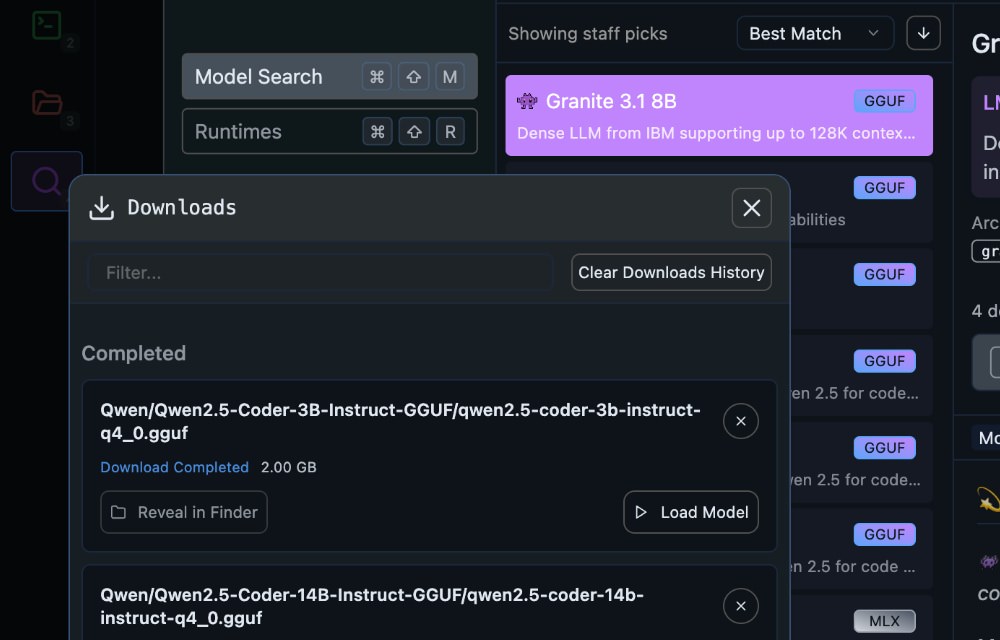
First, open LM Studio and download the LLM you want to use.

For coding assistance, it’s best to choose a model specifically trained on code. In this example, we’ll use the “Qwen2.5 Coder” model with 14 billion parameters.

Downloading model in LM Studio

However, it’s also important to select a model that runs smoothly on your computer. If the 14B parameter model is too heavy, consider trying the 3B parameter version.

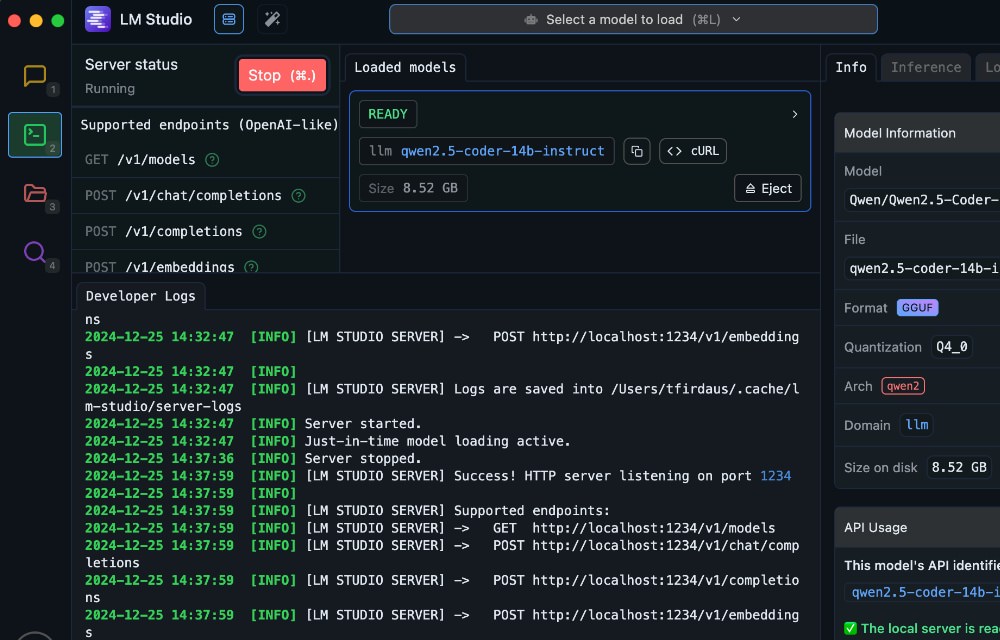
Once you’ve downloaded the LLM, load it in LM Studio and start the server. You’ll find the server controls in the “Developers” panel of the sidebar as shown in the screenshot below. The server should start running at http://localhost:1234, and you’ll see the available endpoints listed.

Starting server in LM Studio

Connecting LM Studio to VS Code

To leverage LM Studio’s AI power within VS Code, we’ll install the open-source extension, Continue.dev. This extension specializes in AI code assistance, making it a perfect fit for our needs.

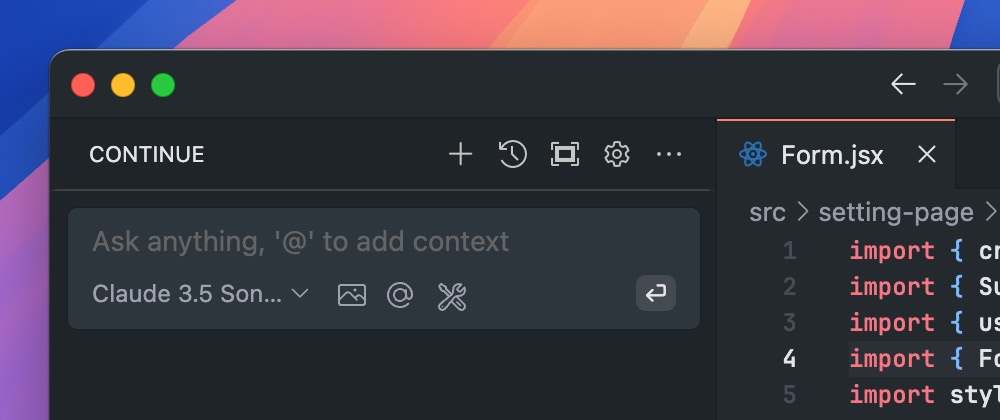
After installation, you’ll see a new tab appear in the VS Code sidebar. This is the “Continue” tab.

Continue.dev tab in VS Code sidebar

Within the tab, we can find the Chat field where you can interact with the AI assistance.

Chat field in Continue.dev tab

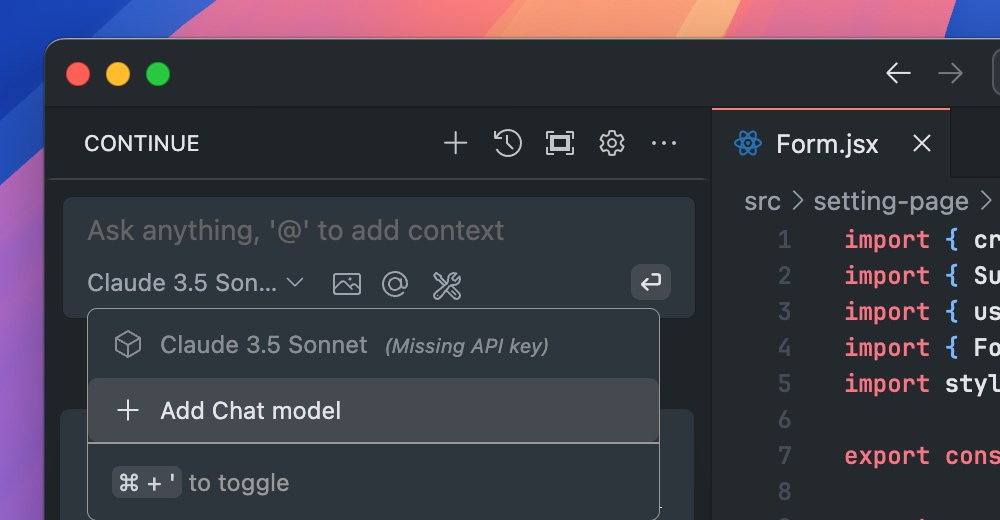
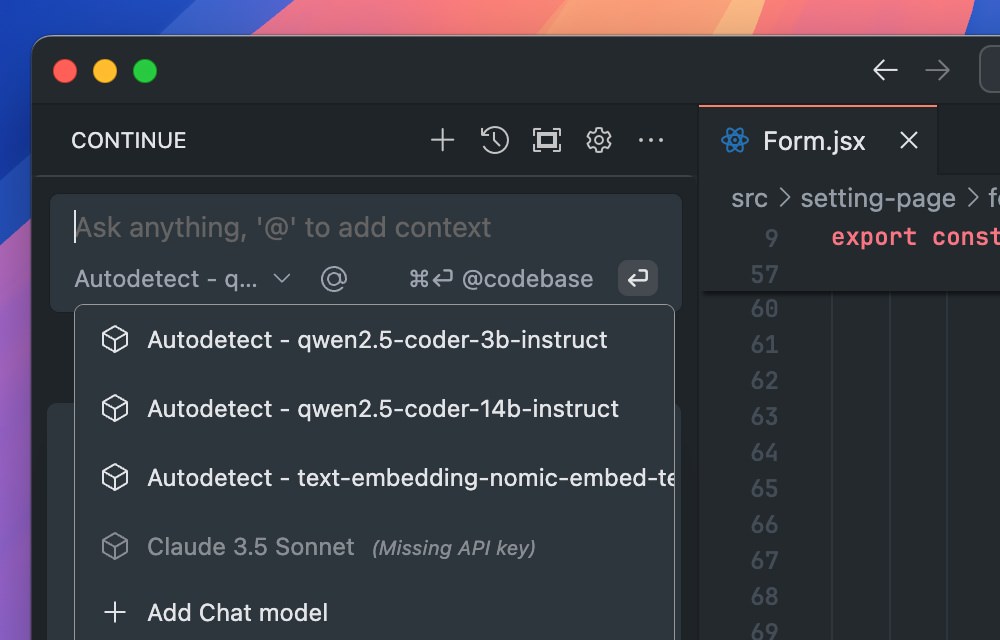
While the Chat field seems functional, it won’t work or respond to your queries yet. We need to select the LLM model for the Chat to use. To enable it, click on the Model option at the bottom of the field and select + Add Chat model

Adding chat model in Continue.dev

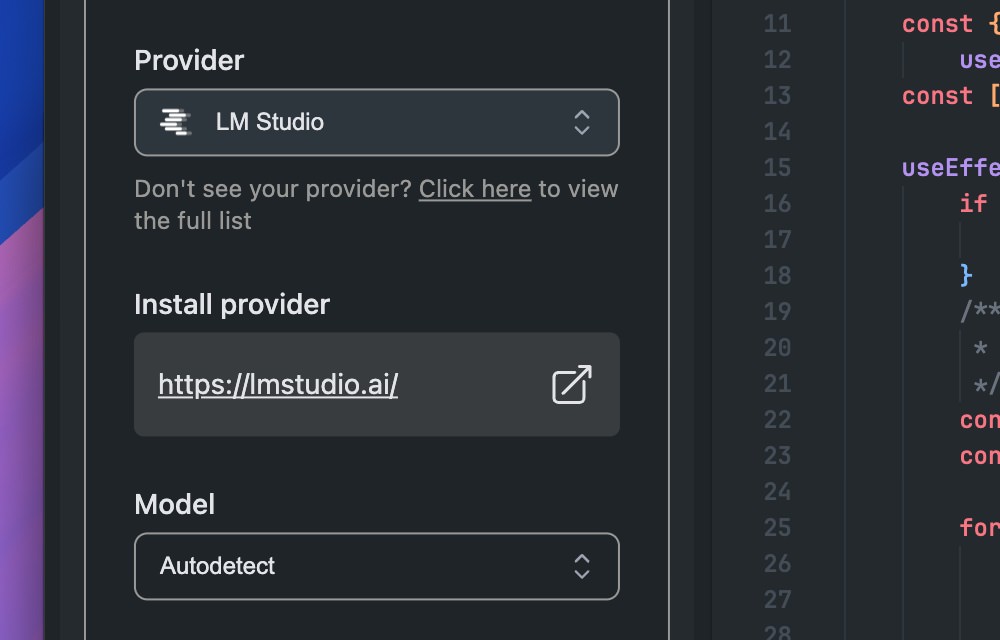
Select “LLM Studio” as the Provider and “Autodetect” as the Model.

Selecting LLM Studio as provider

Once connected, the Chat field will display available LLM models from LM Studio. In this example, we’ll choose the “Qwen2.5 Coder with 14B” model that we’ve downloaded and set up in LM Studio.

Selecting Qwen2.5 model options

Using the Chat Field

The Chat field works similarly to other AI assistants. You can interact with it by asking questions, requesting suggestions, or even generating code snippets. Here are some examples:

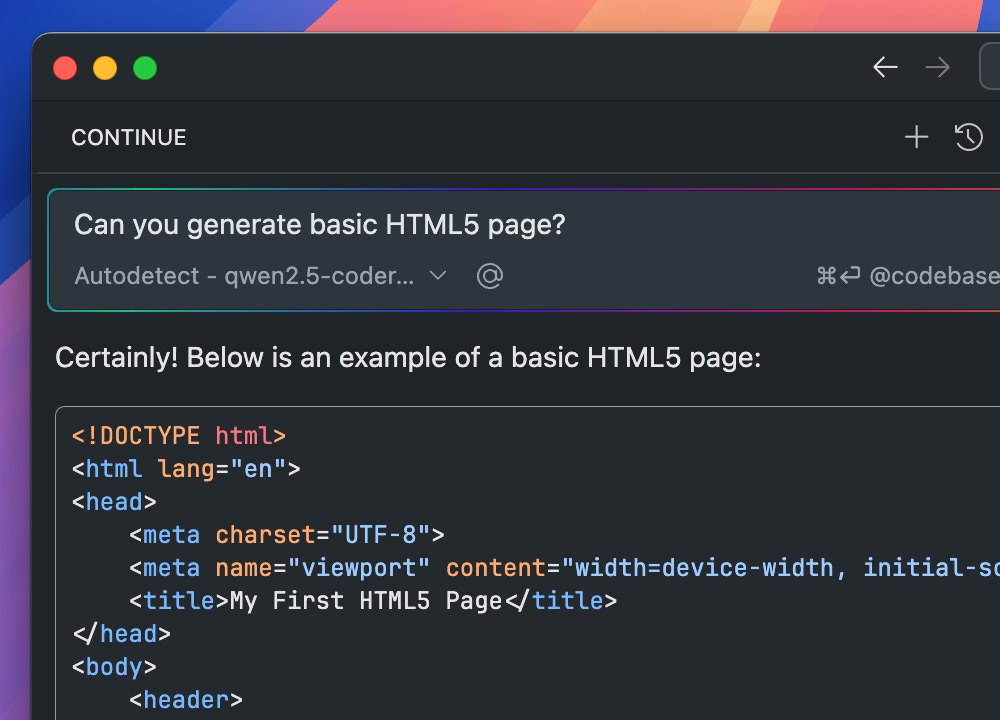
Ask for a simple HTML document snippet:

Generating HTML snippet with AI chat

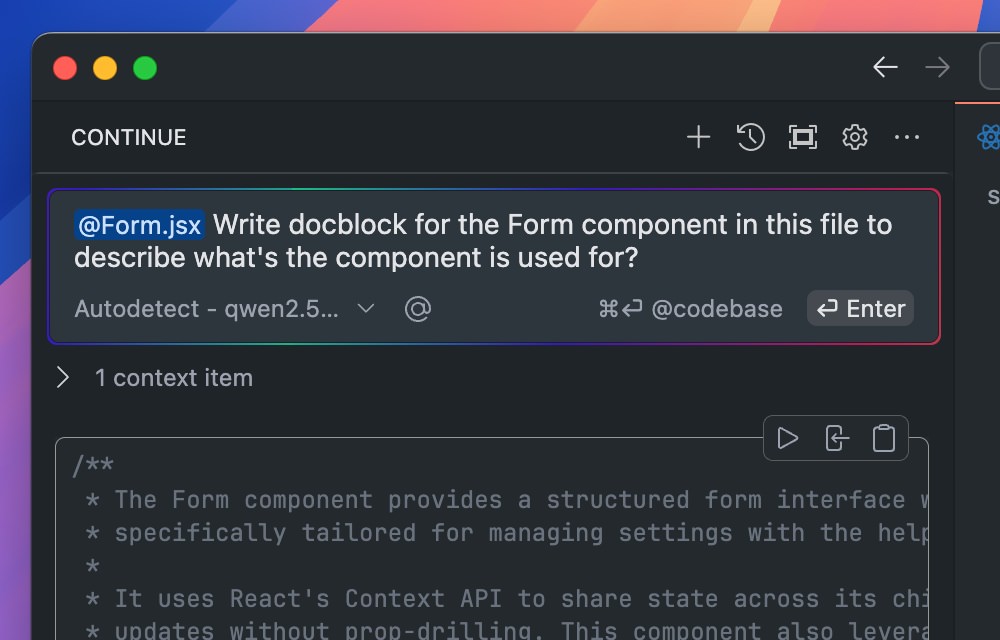
Use the @ symbol and select “Files” to provide context. For example, attach the current file to generate a docblock for a specific component.

Generating docblock with context in AI chat

Configuring Autocompletion

Autocompletion is one of the most common features found in AI-powered code editors. In this case, with Continue.dev + VS Code setup, it might not be enabled yet. To enable it, open the config file at ~/.continue/config.json, and add in the following to connect the autocompletion to LM Studio.

{
    "tabAutocompleteModel": {
        "apiBase": "http://localhost:1234/v1/",
        "title": "Qwen2.5-Coder 14B",
        "provider": "lmstudio",
        "model": "qwen2.5-coder:14b"
    }
}

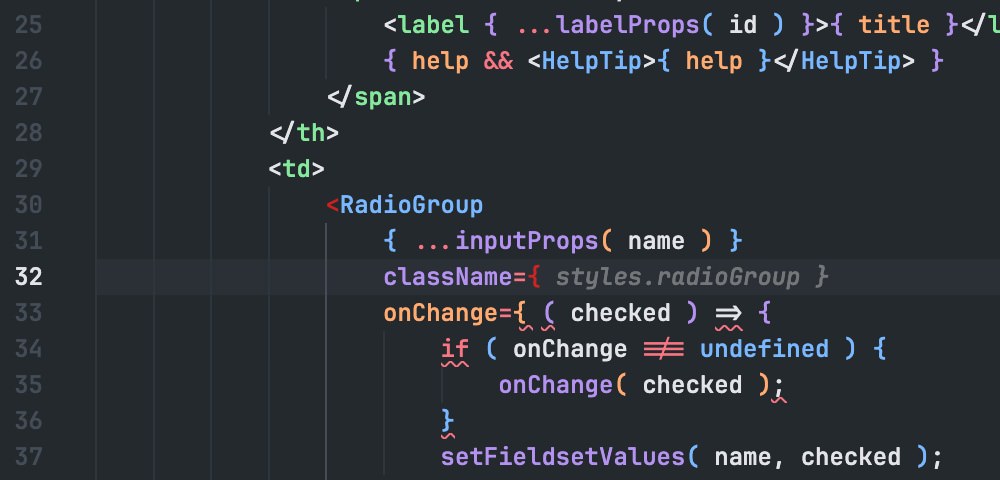
Once that’s set up and saved, you should see the autocompletion working in your VS Code editor.

Autocompletion enabled in VS Code with AI

Wrapping Up

And that’s how you can use LM Studio for AI assistance in Visual Studio Code. It’s a great way to have AI assistance in your code editor without relying on the cloud. It’s also free and you can select the model that’s best for your computer. A great alternative to cloud-based services like OpenAI or GitHub Copilot.

Give it a try and see how it can help you in your coding tasks.

10 Best WordPress Plugins For 2025 (Free and Paid)

 For digital creators, developers, and designers who expect innovative tools, your chosen plugin should be flexible enough to keep you relevant well beyond 2025.

If a WordPress plugin doesn’t offer modern features, lacks regular updates, or forces you into clunky workarounds, it’s going to slow you down in the long run.

Best WordPress Plugins

We’ve sifted through countless plugins and narrowed things down to a handful that truly stand out for their features, design potential, and ongoing support.

If you’re aiming to build or enhance cutting-edge websites, keep reading.

Best WordPress Plugins for Digital Creators in 2025

These plugins have been tried, tested, and praised by developers and designers alike. They feature intuitive interfaces, robust backends, and the flexibility to adapt to a variety of sites or client needs.

What you Need to Look for in a WordPress Plugin

1. Choose Future-Proof Plugins

Like a theme, a plugin needs to keep up with design trends and tech changes. Look for active development, responsive support, and updates that keep pace with WordPress itself.

2. Look at The Track Record

With thousands of best WordPress plugins to comb through, focusing on the ones with the best track record – like wpDataTables or Slider Revolution – helps cut through the noise.

3. What You Should Prioritize
  • Ease of Use: Even powerful tools should be user-friendly.
  • Customization: Don’t settle for a plugin that boxes you into limited layouts or styling.
  • Performance: If a plugin slows down your admin, it’ll likely frustrate your visitors, too.
  • Support: Quick, knowledgeable assistance can save you hours (or days) of headaches.
4. Specific Plugin Highlights
  • Brizy Website Builder focuses on slick, block-based editing.
  • Amelia streamlines appointment bookings with minimal fuss.
  • wpDataTables transforms data management into an intuitive visual experience.
  • LayerSlider and Slider Revolution breathe life into your designs with dynamic visual content.
  • Fancy Product Designer and Essential Grid offer advanced customization for online stores and galleries.
  • Map SVG helps you generate interactive maps with ease.
  • IvyForms is a modern, straightforward form builder.
  • SSL Insecure Content Fixer keeps your site secure without complicated setup.

What Sets These Plugins Apart?

Just like top-tier themes, these best WordPress plugins share a few defining qualities:

  1. Ease of Use: Fancy features don’t mean much if they’re locked behind confusing interfaces. Each plugin listed here is lauded for intuitive dashboards and helpful tutorials.
  2. Builder & Integration Options: From Brizy and LayerSlider to more niche tools like Map SVG, these plugins integrate seamlessly with popular page builders and themes – crucial for developers juggling multiple sites or client projects.
  3. High Customization: Whether you’re designing cutting-edge visuals or streamlining user flows, these plugins let you tailor the experience to your needs – without wrestling with endless lines of code.
  4. Performance: Sluggish plugins can kill both user experience and your workflow. The plugins featured here are optimized to avoid bloat and keep your dashboard (and site) running smoothly.
  5. Active Support: Even seasoned developers can hit snags. Look for plugins backed by responsive support teams, robust documentation, and engaged user communities.

How to Pick Your Perfect Plugin

  • Preview & Test: Whenever possible, try free versions or demos. Make sure the plugin aligns with your project scope, whether that’s eCommerce, appointment scheduling, or slick interactive visuals.
  • Check for Updates: Read the changelog or look at the last update date. A plugin that hasn’t been updated for months (or years) is a risky investment.
  • Evaluate Your Workflows: If you’re using Elementor or Gutenberg extensively, ensure your plugin of choice plays nicely with those tools.
  • Consider Future Needs: Plugins that are “future-ready” will make it easier to scale or pivot as your site or client base grows.

By leaning into developer-centric featuresregular updates, and robust support, you’ll equip your site with the tools it needs to shine in 2025 – and beyond. Whether you’re crafting stunning websites, eye-popping sliders, automating appointments, or simply adding an extra layer of security, these plugins stand ready to elevate your WordPress experience.

Examples of Key Benefits These Plugins Provide:
  • Enhanced Website Performance: Plugins like Brizy Website Builder boost site speed and ensure smooth functionality and responsiveness.
  • User-Friendly Design: Plugins like LayerSlider, Slider Revolution, and Essential Grid make it simple to create visually stunning content.
  • Automation and Efficiency: Amelia saves businesses time and money by streamlining key operations.
  • Advanced Security Features: SSL Insecure Content Fixer automatically fixes mixed content for secure websites.

1. Brizy Website Builder: Noted for Its User-Friendly Setup and Intuitive Interface

A standout drag-and-drop editor that prioritizes simplicity and efficiency, requiring no coding knowledge or complex setup procedures.

This video showcases Brizy’s most popular features. Click to explore it.

Brizy stands out by keeping its controls front and center, eliminating clutter and enabling efficient on-page editing. This approach lets users focus on creativity without getting tangled in technical complexities.

Their Brandio payment processing demo is one of their most downloaded templates, demonstrating the platform’s capabilities. The template library continues to grow, with new demos added monthly.

Key features you’ll appreciate:

  • Drag & Drop Simplicity: Content, columns, and rows snap into place instantly with simple drag-and-drop functionality.
  • Ready-to-Use Design Elements: Quick access to text, buttons, images, icons, videos, and maps for instant implementation.
  • 500+ Pre-Made Blocks: Jump-start your design with conversion-focused, expertly crafted blocks.
  • 4000+ Icons: Comprehensive icon library available in both outline and glyph styles, easily searchable.
  • Mobile-Friendly Editing: Dedicated Mobile View for optimizing layouts on smaller screens.

Perfect for website builders, designers, and anyone looking to create professional websites without coding knowledge.

 Download Brizy Website Builder Now

Current Rating: 4.5/5 (G2), 4.6/5 (Capterra), 4.2/5 (Trustpilot)

User Review: “Game-changing for WordPress and productivity. The interface is the easiest on the market by far; you get to know it very quickly. I have been with Brizy since day one and have seen how much work they have put into it to get it to where it is today.”

2. Amelia: A Game-Changer in the Area of Scheduling Software

A comprehensive scheduling solution that streamlines the entire booking process automatically, from initial scheduling through to reminders and follow-ups.

This video demonstrates Amelia’s most popular features. Click to explore it.

The standout “Packages” feature enables businesses to combine multiple services into comprehensive bundles, creating a seamless booking experience for customers.

Through intelligent automation, Amelia significantly reduces administrative workload, minimizes booking errors, and maintains efficient appointment management. You can see these capabilities in action through their Digital Agency Demo.

Key features you’ll love:

  • Intuitive Interface: Easy-to-use design that works smoothly for both businesses and clients.
  • Service Packages: Bundle multiple services together for streamlined booking.
  • Automated Management: Handles scheduling, reminders, and follow-ups automatically.
  • Comprehensive Integration: Works seamlessly with existing business systems.
  • Error Prevention: Smart booking system minimizes scheduling conflicts and mistakes.

Primary users include service business owners, web developers, and agencies looking for efficient scheduling solutions.

AI Agents 101: Unlocking the Secrets of Smart Automation

  Let’s talk about AI agents – they’re like the superheroes of the tech world,   doing tasks on their own , much like you or I would. Imagin...